Compliment November 8 2026 Update
Post-launch patch checklist for HUD, gems, codes, exploration, and voting meta.
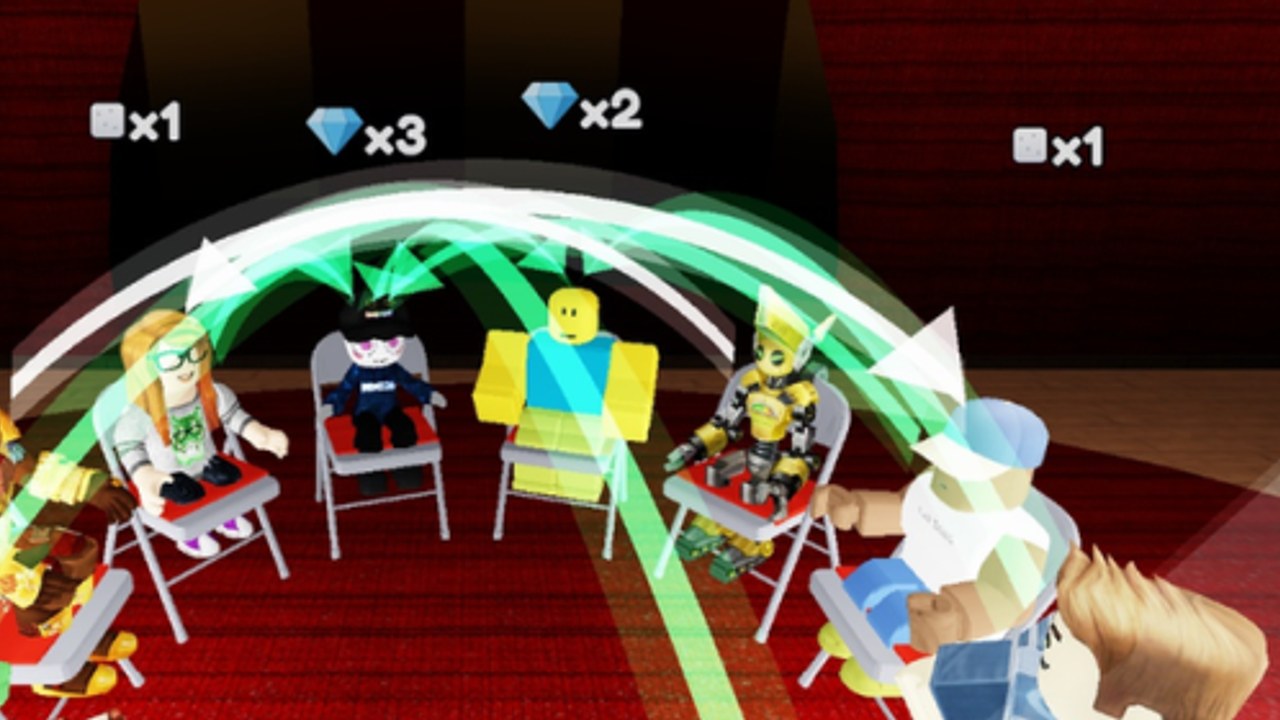
On 8 November 2026, TÄ Games shipped a notable update for Compliment on Roblox. The experience had already launched on 22 October 2026 and climbed past roughly 2.78 million visits with about 78,000 favorites and busy 16-player Party & Casual lobbies. This leaf page is the practical changelog companion to the Updates Hub: what players should re-check in-game, which wiki guides may need a fresh pass, and how to avoid scam “update scripts.”
Studio notes on Roblox can be short. When official bullets are thin, verify changes live, then confirm creator posts linked from the Players Hub and Links Hub.
Snapshot before you join
| Fact | Value |
|---|---|
| Game | Compliment |
| Creator | TÄ Games (verified group) |
| Launch | 22 October 2026 |
| This patch | 8 November 2026 |
| Genre | Party & Casual |
| Max players | 16 |
| Core reward signal | Green arrows → gems |
As of 15 November 2026, community code trackers still reported no working codes. Always re-open the Codes Hub after patches anyway — promos often follow updates by hours or days.
Post-update checklist (do this in order)
1. HUD and Codes button
Join a live lobby and confirm the Codes control, vote targets, and reveal feedback still match Controls & UI. If a button moved, rejoin once before assuming it vanished.
2. Green arrow / gem feedback
Play three full question cycles. Confirm that green arrows still feel like the gem signal described in Green Arrows Explained and How to Earn Gems.
3. Prompt pack vibe
New questions can shift meme versus literal balance. Recheck S/A/B/C defaults on the Tier List and Voting Strategies.
4. Exploration landmarks
If you hunt the hidden space, retest routes from Secret Area after map or lighting tweaks.
5. Friend / lobby flow
Invite a friend using the habits on Play with Friends. Confirm join links still land in the same experience build.
6. Safety pass
Ignore YouTube thumbnails promising “November update scripts” or infinite gems. Read the honest Scripts Hub instead.
What this update is (and is not)
Compliment remains a social voting party game: read the question, tap who fits, watch arrows fly. The November patch sits in the early post-launch quality window — expect HUD polish, prompt refreshes, stability work, or small exploration tweaks rather than a genre pivot into combat.
Do not assume:
- Daily codes are guaranteed
- VIP private servers are suddenly required (Roblox VIP creation can stay disabled depending on experience settings)
- Injectors became “safe because of the update”
How this wiki tracks the patch
- Confirm live behavior against creator channels
- Keep facts aligned with release status and systems
- Refresh Codes tables without inventing strings
- Note UI diffs on Tools and Troubleshooting pages
- Cross-link Tips and voting pages when meta shifts
If something major lands after 8 November, a new leaf will join this one under the Updates Hub. Until then, treat this page as your re-verification script.
Player actions today
- Run the six-point checklist above in one sitting
- Bookmark How to Redeem Codes for the next drop
- Practice ten careful votes using Tips and Tricks
- Share patch gotchas kindly — Compliment thrives on good lobbies
Related pages
- Updates Hub — full timeline
- Troubleshooting — “something feels broken” after patches
- TÄ Games — creator context
- Getting Started — relearn the loop fast
Stay curious after every Compliment update. The compliments stay the same; the details around them are what this leaf tracks.
Frequently Asked Questions
Quick answers about Compliment on Roblox.
When did the Compliment November 2026 update release?
A notable update landed on 8 November 2026, after the 22 October 2026 launch.
Did the November 8 update add codes?
As of 15 November 2026 no working codes were listed. Recheck the Codes Hub after every patch.
What should I test first after the update?
HUD and Codes button, then green arrow feedback, then voting feel. Use the checklist on this page.