Getting Started with Compliment
Your first lobby, first reveal, and first green arrows explained without spoilers for the fun.
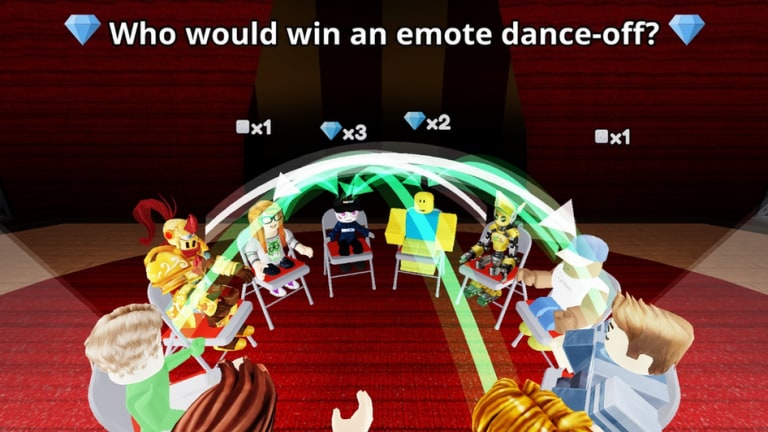
Compliment is a Roblox Party & Casual game by TÄ Games where saying nice things about other players is the entire sport. This Getting Started guide takes you from the experience page to a confident first session: how to join, what each round asks you to do, why arrows matter, and which wiki pages to open next. The game released on 22 October 2026, supports up to 16 players, and already sits at millions of visits — so lobbies fill fast and the social energy stays high.
If you only remember three steps, remember these: read the question, tap the player who fits it best, then watch the reveal. Green arrows are the gem signal. Everything else on this wiki expands those beats.
Join the experience
- Open the official Compliment Roblox page.
- Press play and wait for the place to load on your device.
- Land in a lobby with other avatars (public match) or create a private server for friends.
- Give the HUD a second to appear before you hunt menus — Codes and voting controls live on-screen.
Brand-new Roblox accounts should finish any platform tutorials first so camera and touch controls feel normal. Parents helping kids can skim the Scripts Hub safety notes even if you never install an executor — knowing what to refuse matters.
The core loop in plain language
1. Read the question
Each round presents a prompt about who fits a compliment or soft roast-style vibe best. Read the full sentence. Do not tap the first friend you see unless the text truly matches them. Misreads are the number one cause of awkward reveals.
2. Tap the player who fits it best
Look around the lobby. Consider outfits, inside jokes, recent chat, and who actually matches the prompt. Tap or click that avatar to lock your vote. On mobile, take an extra beat so you do not select the wrong overlapping character. Details for buttons live on Controls & UI.
3. Watch arrows fly during the reveal
When the round resolves, arrows show how votes traveled. Green arrows are the celebration state tied to gem rewards. Other arrow outcomes still teach you how the lobby thinks. Laugh, note patterns, and get ready for the next question.
That loop is the whole fantasy. There is no separate combat layer to unlock before you can participate.
Your first-session checklist
- Complete at least one full question → vote → reveal cycle without leaving
- Notice where the Codes button sits even if no codes work yet (Codes Hub)
- Earn or observe at least one green arrow moment
- Mute or report only if someone breaks Roblox rules — normal teasing that stays kind is part of the genre
- Invite one friend if public lobbies feel chaotic (Players Hub)
- Skim How to Earn Gems before your second session
Understanding gems early
Gems are the progress signal most players chase. They primarily arrive when your social read lands well enough to produce green arrow feedback. Codes can add gifts later, but as of 7 November 2026 there were no working codes, so skillful voting is your reliable path. Do not install scripts promising free currency — see Scripts.
Social basics that keep lobbies fun
Compliment thrives on kindness. Vote for the prompt, not to target someone unfairly. If a question would embarrass a younger player, pick a lighthearted fit or skip mean-spirited pile-ons. Friend servers change the math: people will bias toward each other, which is fine when everyone consents to the bit. Public servers reward broader room reading — more on that in Voting Strategies and Tips and Tricks.
Exploration after you can vote cleanly
Once the HUD feels automatic, try the Secret Area as a side goal. Searching mid-round is harder in busy public lobbies, so bring friends or wait for downtime between questions. Check Updates after the 8 November 2026 patch and future changes so map tips stay accurate.
Platform notes
Desktop: Mouse hover helps disambiguate stacked avatars.
Mobile: Pinch camera control before voting if the lobby is crowded.
Console: Use the virtual cursor carefully on the Codes and vote targets.
Regardless of platform, the rules of the loop stay identical.
What to open next on this wiki
| Goal | Page |
|---|---|
| More gems | How to Earn Gems |
| Better instincts | Tips and Tricks |
| Strategy tiers | Tier List Hub |
| Promo codes | Codes + How to Redeem |
| HUD map | Tools / Controls |
| Creator context | Players + Links |
Mindset for session two
You do not need a perfect meta on day one. You need clean reads, kind vibes, and curiosity about why the lobby voted the way it did. Watch one reveal closely without spamming jumps. Ask yourself whether popularity, friendship, or the literal prompt won. That single reflection improves your next green arrow rate more than any unverified script.
Compliment is intentionally easy to start and surprisingly deep once you care about reading people. Finish this guide, jump in, and let the arrows teach you the rest.
Frequently Asked Questions
Quick answers about Compliment on Roblox.
How do you play Compliment on Roblox?
Read each question, tap the player who fits it best, then watch the reveal. Green arrows award gems.
How many players can join a Compliment server?
Servers support up to 16 players in this Party & Casual experience by TÄ Games.
Do I need codes to start enjoying the game?
No. Codes are optional. As of 7 November 2026 none were working; play the voting loop instead via this guide and How to Earn Gems.
Where can I see the game in action?
Watch the embedded gameplay video on this page, then compare it with your own first lobby.